
Winter Image 10 Ai Prompts for Gemini
AI Prompt photo editing is becoming extremely popular—whether it’s for social media, professional branding, or creative winter-themed portraits. With advanced tools like Google Gemini, Hano, Midjourney, or other AI editors, you can transform any simple picture into a magical winter artwork. The most important part is crafting a perfect prompt that gives the AI clear instructions, especially when you want the photo to stay realistic and keep your original face 100% unchanged.
In this article, you’ll learn how to write effective winter prompts, how to upload your image in Gemini for editing, and you’ll also get 10 ready-made winter AI prompts to use immediately.
How to Upload an Image in Google Gemini (Method)
Here is the simple method to use your picture in Gemini while editing:
- Open Google Gemini.
- Click the image upload icon near the chat box.
- Upload the photo you want to edit.
- After uploading, type the AI prompt (from the list below).
- Make sure your prompt includes a line like:
“Keep the 100% original face from the uploaded image.” - Hit enter—and let the AI generate your edited winter image.
This method works for most AI editors with an image-upload option.
10 Winter AI Prompts (Gemini/Hano/Winter Editing Ready)
Below are 10 winter prompts that you can directly paste into Gemini or any AI photo editor.
Each prompt includes the required line: keep the 100% original face.
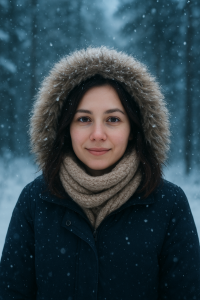
1. Snow Forest Portrait
“Create a winter portrait of the uploaded person standing in a snowy forest with soft falling snow. Add a warm winter coat and scarf. Use soft white lighting and a realistic photography style. Keep the 100% original face from the uploaded picture.”
2. Cozy Winter Street Look
“Transform the uploaded image into a cozy winter street photoshoot. Add snowflakes, warm streetlights, and a stylish winter jacket. Use cinematic tones. Keep the 100% original face exactly the same.”
3. Christmas Market Theme
“Edit the uploaded photo into a Christmas market scene with lights, decorations, and winter stalls. Add a festive warm glow. Keep the original face unchanged, 100% same.”
4. Snowfall Close-Up Portrait
“Create a close-up winter portrait with soft snow landing on hair and clothes. Add a fluffy winter hood and soft lens blur. Keep the face exactly the same as the uploaded image.”
5. Ice Kingdom Fantasy Look
“Turn the uploaded image into a fantasy winter Ice Kingdom portrait with icy blue tones, glowing snow crystals, and magical light. Maintain the 100% real face from the uploaded picture.”
6. Mountain Winter Adventure
“Edit the uploaded person into a snowy mountain background wearing winter trekking gear. Add natural lighting and clear snow textures. Keep the original face exactly the same, no changes.”
7. Winter Café Aesthetic
“Place the uploaded person in a warm winter café setting with frost on the windows and cozy lighting. Subtle snow visible outside. Keep the 100% original face with no modifications.”
8. Holiday Greeting Card Style
“Convert the uploaded image into a holiday greeting card design with winter decorations, snowflakes, and festive colors. Do not alter the face—keep it 100% original.”
9. Winter Wonderland Glow
“Transform the uploaded picture into a glowing Winter Wonderland scene filled with bright snow, soft lights, and magical atmosphere. Keep the original face, 100% unchanged.”
10. Urban Winter Fashion Shoot
“Edit the uploaded person into an urban winter fashion photoshoot with snowy city streets, stylish winter wear, and dramatic lighting. Face must remain 100% original from the uploaded image.”
Tips for Writing the Perfect Winter AI Prompts
To get the best results:
- Be very specific about the winter theme (snow, lighting, vibes).
- Mention clothing style (coat, scarf, gloves, etc.).
- Add visual mood like cozy, cinematic, fantasy, holiday, etc.
- Always include:
“Keep the 100% real face from the uploaded image.” - Ensure the prompt explains the scene, style, and details in simple steps.
Conclusion
Winter AI prompts allow you to create beautiful, cinematic, and artistic images with just a few words. By adding the essential instruction to keep your real face 100% unchanged, your edits stay realistic and personal.
Use these prompts with Gemini, Hano, or any advanced AI editor—and your winter photos will look stunning in seconds.
FAQs About Winter AI Prompts (Short & Clean)
Q1: What are winter AI prompts?
Winter AI prompts are short instructions used in AI editors to create snowy, cold-season themed photo edits.
Q2: Can I use these prompts in Gemini or Hano?
Yes, all prompts are fully compatible with Gemini, Hano, Midjourney, and other AI editors.
Q3: How do I upload a photo in Gemini?
Click the image-upload icon > add your picture > paste the prompt > press enter.
Q4: Will my face stay the same in edited images?
Yes, if you use the line: “Keep the 100% original face from the uploaded image.”
Q5: Are these prompts beginner-friendly?
Absolutely. Just upload your photo and paste the prompt—AI does the rest.
Q6: Can I customize the clothing or background?
Yes. Simply add details like coat style, colors, environment, etc.
Q7: Do these prompts work for men and women?
Yes, they fit all genders and ages.
Q8: Are the results realistic?
Yes, the prompts are designed for high-quality, natural-looking edits.
Q9: Can I use these prompts for social media photos?
Yes, they are perfect for Instagram, Facebook, TikTok, or profile pictures.
Q10: Are these winter prompts copyright-free?
Yes, they are 100% original and safe to use anywhere.
Many users have shown great interest in the 1win app. This application offers a variety of features. The app’s interface has been noted for its ease of use.
The layout allows users to move seamlessly between sections. Such simplicity enhances the overall user experience. Regular updates ensure that the app meets the evolving needs of its users.
one win apk download [url=https://colombopoets.org/1win-app-download-for-ios-and-android-step-by-step-apk-setup-guide/]one win apk download[/url]